
More of your brand, front and centre
What's new
Your clients should see you, not us. New branding options put more of your agency's identity into the documents and journey your sellers and buyers go through — like a Material Information Certificate carrying your own logo — so every step feels like it's coming from your branch, start to finish.
What you can customise
You can now brand the Material Information Certificate with:
Your logo — displayed on the certificate so it clearly comes from your agency.
Your colour scheme — your agency colours applied across the certificate and its web pages.
Where to set it up
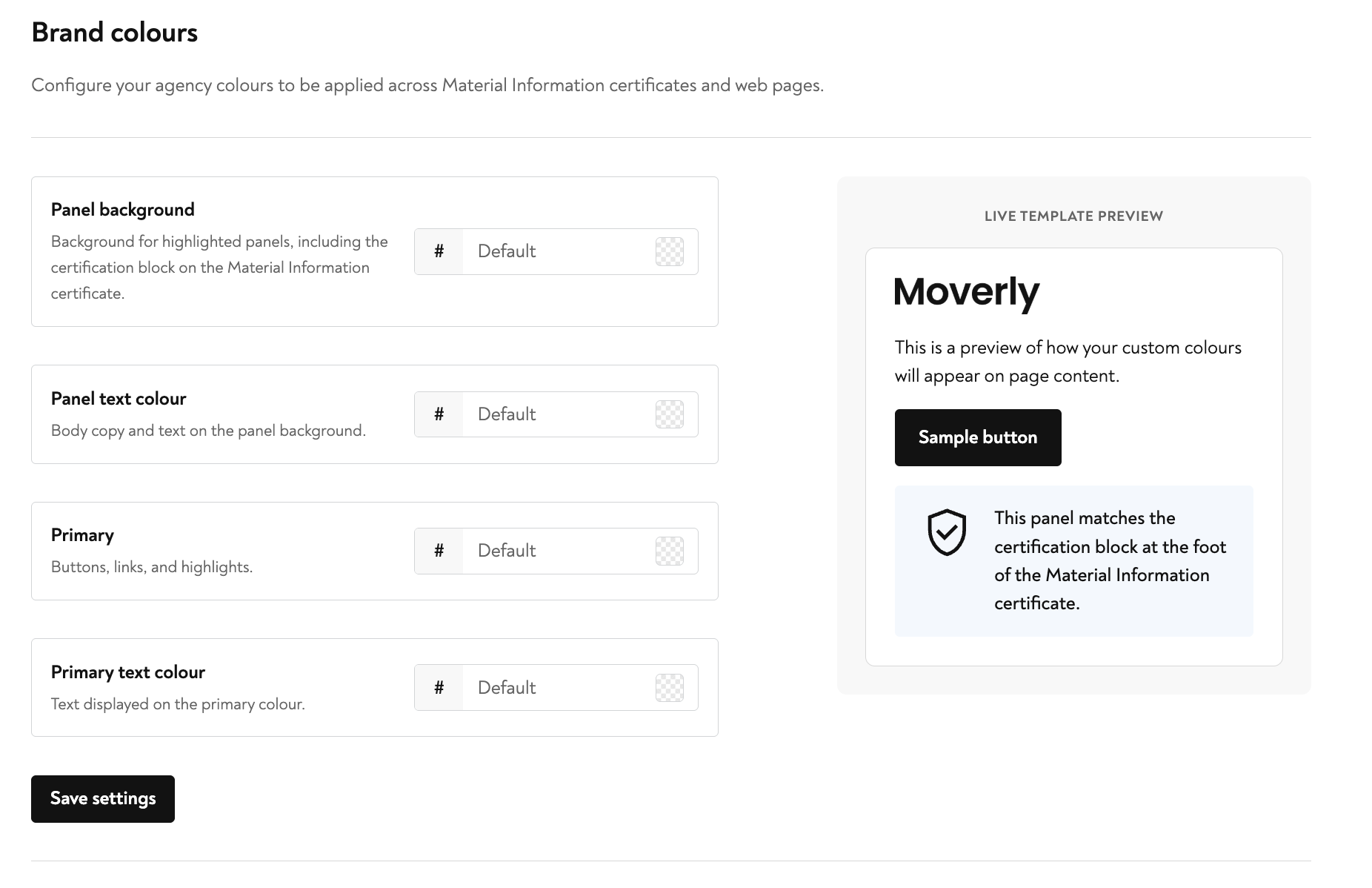
Head to Settings → Branding and you'll find the Brand colours menu. Your colours are applied across Material Information certificates and web pages, and there's a live template preview on the right so you can see exactly how your choices will look before you save.
The colour options
You can fine-tune each part of the look:
Panel background — the background for highlighted panels, including the certification block on the Material Information certificate.
Panel text colour — body copy and text shown on the panel background.
Primary — buttons, links, and highlights.
Primary text colour — text displayed on the primary colour.
Set each one with a hex code (or leave it as Default), watch the live preview update, then click Save settings to apply it across your certificates and pages.